Discover top vinyl cutter machines for DIY projects, sign making, and sticker production. This guide highlights reliable plotters, task-focused features, and practical accessories to help you choose the right machine for accurate cuts, durable performance, and smooth operation in a home or small business setting.
The following table offers a quick snapshot of five selected vinyl cutter models, including their primary capabilities and how to learn more about each option.
| Product | Brand | Max Cutting Width | Connectivity | URL |
|---|---|---|---|---|
| VEVOR Vinyl Cutter 34Inch Bundle | VEVOR | 30.7″ (780mm) | LCD display, USB/COM | View |
| VEVOR Vinyl Cutter 53 Inch Machine | VEVOR | 49.6″ (1260mm) | USB, LCD display | View |
| Likcut Vinyl Cutter S501 | LIKCUT | Varies by design (compact) | Bluetooth 5.0, USB 2.0 | View |
| VEVOR Vinyl Cutter 28 Inch With Stand | VEVOR | 24.8″ (630mm) | USB/COM/Bluetooth | View |
| VEVOR 28 Inch With Signmaster Bundle | VEVOR | 24.8″ (630mm) | USB/Windows & SignMaster | View |
VEVOR Vinyl Cutter 34Inch Bundle

The 34-inch bundle from VEVOR delivers a robust cutting width suitable for larger decals, signage, and vehicle graphics. Key features include a maximum paper feed of 870 mm (34.3″), maximum cutting width of 780 mm (30.7″), and a cutting precision of +/- 0.01 mm. The system uses a D-typed motherboard with 4M cache memory and includes double spring pinch-rollers and a roughened steel roller to maintain accurate alignment over long runs. Cutting pressure is adjustable from 20 to 500 g, and cutting speed ranges from 20 to 800 mm per second. A backlit LCD display supports intuitive operation, making it easier to manage designs and tweaks on the fly. This model is compatible with SignMaster Software for design and cut workflows, supporting a range of vinyl types for banners, banners, and signs.
Ideal applications: large format decals, vehicle graphics, bold storefront signage, and promotional stickers. The bundle typically includes essential tools and supplies to begin producing straight away, reducing setup time for new users.
Pros
- Wide cutting width suitable for big projects
- Clear LCD display for quick adjustments
- Stable hardware with robust paper feed
Cons
- May require a larger workspace
- Set-up can be more involved for beginners
VEVOR Vinyl Cutter 53 Inch Machine

This 53-inch vinyl cutter provides a high-capacity option for professionals and serious hobbyists. It supports a maximum paper feed of 1350 mm (53.1″) and a maximum cutting width of 1260 mm (49.6″). The device maintains precision at +/- 0.01 mm (0.0004″) with a paper feed accuracy of 3 m (118″). Its ARM motherboard and 4M high-speed cache memory stabilize long runs, while double spring pinch-rollers and textured steel rollers help ensure consistent feeding without drift. Cutting pressure is adjustable from 20 to 500 g, and cutting speed from 20 to 800 mm/s, with a backlit LCD display for easier control. The model is compatible with SignMaster software, supporting complex layouts and batches for heavy-duty production.
Common applications: large-scale signage, fleet decals, and sports venue graphics. The broader width enables faster production of larger designs with fewer passes.
Pros
- Very broad maximum cutting width
- Stable performance for long runs
- Good for batch processing with SignMaster
Cons
- Requires substantial workspace
- Higher initial setup for new users
Likcut Vinyl Cutter S501
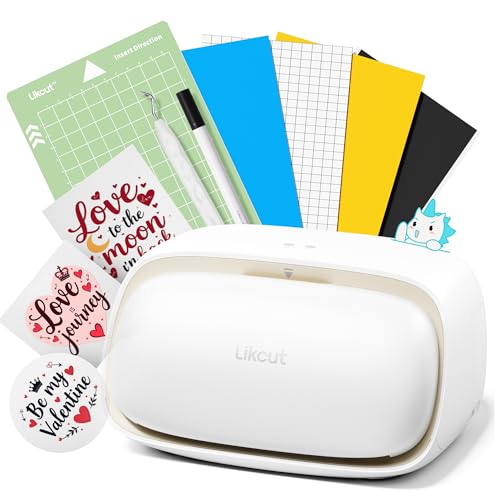
The Likcut S501 presents a compact, portable option designed for sticker joy, crafts, and small-scale projects. It emphasizes connectivity flexibility with Bluetooth 5.0 and USB 2.0, enabling quick pairing and reliable operation in various environments. The device supports fast cutting speeds up to 3.2 inches per second and is built to handle long runs with a blade capable of cutting over 4,610 meters. A built-in front cover offers storage for tools and materials, helping keep workspaces organized. It is well-suited for school projects, DIY crafts, and party supplies, where quick setup and ease-of-use factor heavily into workflow efficiency.
Typical use cases: small business sticker production, classroom projects, personalized gifts, and rapid prototyping of vinyl decals.
Pros
- Compact and portable design
- Fast cutting speed suitable for quick turnarounds
- Bluetooth connectivity with USB backup
Cons
- Smaller cutting width may limit larger designs
- May require additional accessories for full productivity
VEVOR Vinyl Cutter 28 Inch With Stand

This 28-inch model includes a sturdy floor stand and is designed for reliable home workshop use. It features a maximum paper feed of 720 mm (28.3″), a maximum cutting width of 630 mm (24.8″), and a cutting precision of +/- 0.01 mm. The D-typed motherboard and 128K-2M high-speed cache memory support clean, accurate feeds, while dual spring pinch rollers and an aluminum knurling stick help prevent drift during longer cuts. The digital control panel and illuminated LCD provide straightforward adjustment of cutting pressure (10-500 g) and speed (10-800 mm/s). The stand adds ergonomic height and stability for extended sessions.
Best suited for small business signage, run-time projects, and classroom activities where a stable stand and easy setup improve productivity.
Pros
- Sturdy stand improves workflow comfort
- Solid accuracy and repeatable cutting results
- Accessible control panel and LCD display
Cons
- 28″ class may have limited width for very large designs
VEVOR Vinyl Cutter Machine, 28 Inch Paper Feed With Signmaster Bundle

This 28-inch bundle combines precise cutting with SignMaster software activation for Windows systems. It offers a maximum paper feed of 28.3″ (720 mm), a maximum cutting width of 24.8″ (630 mm), and a cutting precision of +/- 0.0004″ (0.01 mm). The device uses a D-typed motherboard with a 2 MB high-speed cache, two double-spring pinch rollers, and an aluminum knurling stick to ensure stable feeding and accuracy. Digital control includes an illuminated LCD interface and a broad adjustment range for cutting pressure (10-500 g) and cutting speed (10-800 mm/s). The bundle typically includes essential blades and supplies to support initial production runs.
Use cases include school projects, craft fairs, and small-batch signage where consistency across multiple pieces is important.
Pros
- SignMaster software integration
- Included supplies for immediate use
- Good balance of width and portability
Cons
- Requires compatible Windows environment for SignMaster
Buying Guide: Key Considerations For Vinyl Cutter Purchases
Selecting the right vinyl cutter involves balancing project scope, workspace, and workflow needs. Consider these purchase factors to align a device with your goals:
- Cutting width and feeder capacity: Match the maximum cut width to your typical design size. Larger widths reduce pass counts on big graphics but require more space.
- Precision and repeatability: Look for devices that offer tight tolerance (±0.01 mm or better). Stability features like dual pinch rollers and quality feed systems reduce drift.
- Drive and control system: A robust motherboard (e.g., ARM or high-speed cache) supports smooth operation on long runs. An illuminated LCD helps during setup and adjustments.
- Connectivity and software: Bluetooth, USB, and SignMaster compatibility expand workflow options. Confirm Windows or macOS requirements for software like SignMaster or SignMaster activation codes.
- Accessories and bundles: Starter blade kits, extra blades, vinyl rolls, transfer tape, and stands impact initial costs and ramp-up time.
- Workspace and noise: Larger cutters demand more space and ventilation. Check the noise level if the device will operate in shared spaces.
- Support and warranty: Vendors offering comprehensive support, tutorials, and return policies help minimize downtime.
When evaluating multiple models, consider a mix of wide-format capability for larger decals and compact options for quick, personal projects. A SignMaster-enabled bundle can streamline production workflows, especially in settings that require repeated runs or professional signage outputs.