For hobbyists and small shops alike, embroidery machines that connect to phones offer a streamlined workflow: design on a mobile device, transfer wirelessly, and embroider with precision. This guide highlights five wireless or app-enabled machines popular with American users, detailing how each integrates with mobile devices and what to expect in everyday use. Whether you want built-in designs, large embroidery areas, or multiple hoops, these models provide convenient connectivity and flexible features to boost productivity and creativity.
| Product | Brand | Phone Connectivity | Hoop Size / Embroidery Area | Notable Feature |
|---|---|---|---|---|
| Brother SE700 Sewing And Embroidery Machine | Brother | WiFi / App capable | 4″ x 4″ | Built-in designs with Design Database Transfer and Artspira mobile app |
| Brother PE545 Embroidery Machine | Brother | WiFi / App capable | 4″ x 4″ | Wireless file transfer and Artspira app support |
| PooLin EOC06 Embroidery Machine | Poolin | Wireless | 7.9″ x 11″ | Multiple hoops included; USB and wireless transfer |
| PooLin EOC05 Embroidery Machine | Poolin | WiFi Transfer | 4″ x 9.25″ | Embroidery-only, home-friendly size |
| PooLin EOC05(2in1) Sewing & Embroidery | Poolin | WiFi Transfer | 4″ x 4″ & 4″ x 9.25″ | Two embroidery areas; comprehensive kit and training |
Brother SE700 Sewing And Embroidery Machine

The SE700 combines sewing and embroidery in one unit and includes wireless capabilities for file transfer. It features 135 built-in designs and 103 stitches, a 4″ x 4″ embroidery area, and a 3.7″ touchscreen for quick navigation. Built-in WiFi supports Design Database Transfer from a PC and connects with ARTSPIRA, enabling mobile-based pattern creation and wireless pattern transfer. The machine’s compact footprint makes it suitable for home studios and small workspaces. Built-in fonts and patterns expand creative options without needing a separate computer for most projects.
Connectivity is a primary strength: design files can be sent wirelessly from a PC, and the ARTSPIRA app allows drawing patterns on a mobile device or downloading patterns to the SE700. The 4″ x 4″ hoop remains ideal for small-to-medium motifs, monograms, and apparel embellishments. While not a heavy-duty commercial model, its blend of features and wireless design transfer is attractive for enthusiasts who want flexibility and immediate visual feedback on a handheld device.
Features to note include: a user-friendly 3.7″ touchscreen, a range of included presser feet, and compatibility with Design Database Transfer for seamless workflow. The wireless options enhance ease of use for hobbyists attaching designs to garments or home textiles. For beginners, the SE700 provides guided practice stitches and straightforward embroidery layouts, with room to grow into more complex projects as confidence builds.
Brother PE545 Embroidery Machine

The PE545 is designed for wireless embroidery with a 4″ x 4″ embroidery field and a large 3.7″ LCD touchscreen. It supports wireless transfers via Design Database Transfer and can receive patterns through the ARTSPIRA ecosystem, enabling users to draw or download designs from a mobile device and push them to the machine. The PE545 emphasizes compact size with reliable performance, making it a practical option for hobbyists who want mobile-friendly design workflows without sacrificing embroidery capability.
Key advantages include a built-in USB port for direct file transfer and an intuitive interface for quick design placement. The machine’s embroidery field is well-suited for monograms, patches, and small motifs on apparel and home decor. Designers who enjoy on-the-go adjustments will appreciate the ability to move projects from phone to hoop seamlessly, helping to streamline creative sessions without constant computer access.
Considerations: while compact, the PE545 focuses on embroidery rather than a broad sewing feature set; it’s best for users prioritizing embroidery transfer and mobile-friendly design workflows. The seamless connection to ARTSPIRA enhances creative exploration with pattern libraries and drawing capabilities on a phone or tablet.
PooLin EOC06 Embroidery Machine

The PooLin EOC06 offers a 7.9″ x 11″ embroidery area with a 7″ touchscreen and wireless transfer options. It ships with multiple hoops (2 x 5.5″ x 5.5″, 1 x 7.9″ x 7.9″, 1 x 7.9″ x 11″), expanding design versatility for clothing, home textiles, and accessories. USB and wireless transfer provide flexible file management, enabling patterns created on a computer or mobile device to be loaded quickly onto the machine. This model targets crafters who want larger embroidery projects without stepping into industrial-grade equipment.
Notable features include a large embroidery area for bigger motifs, a user-friendly interface, and ongoing support through official channels. The ability to transfer designs wirelessly can simplify workflows for those who design on tablets or phones. This machine is well-suited for users who need more room for complex patterns while maintaining accessible operation and reliable performance for home-based stitching projects.
Practical considerations: the EOC06’s size and hoop options are ideal for moderate to larger projects. For beginners, exploring digitizing options and software compatibility will help maximize the large embroidery area. The mix of USB and wireless transfer supports diverse file workflows for varied design sources.
PooLin EOC05 Embroidery Machine

The EOC05 is an embroidery-focused machine with a 4″ x 9.25″ area and a seven-inch touchscreen. It emphasizes home DIY use and WiFi design transfer, enabling pattern loading and updates from a mobile device or computer. This model targets users who want a straightforward, embroidery-only option with wireless transfer for convenience and flexibility in pattern delivery.
Key strengths include a user-friendly size for home projects, clear embroidery area suitable for apparel and gifts, and seamless wireless transfer for on-the-go design updates. The EOC05 is a good fit for crafters prioritizing embroidery capabilities with simple connectivity to mobile devices, making it easy to experiment with patterns and personalize items without complex setup.
Potential considerations: as an embroidery-focused machine, there is no sewing functionality. Owners should consider whether a broader sewing-capable unit would better suit their needs if they want to combine sewing and embroidery in one machine.
PooLin EOC05(2in1) Sewing & Embroidery
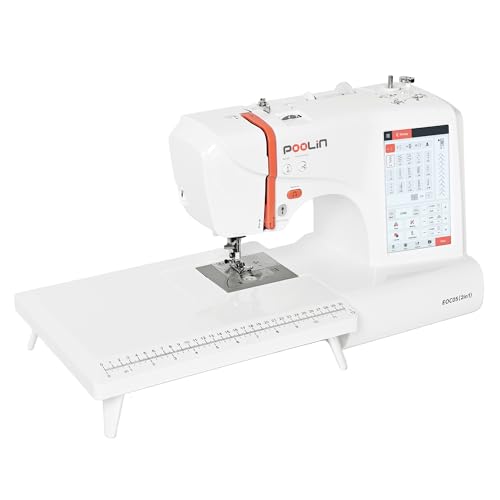
The 2in1 model combines sewing and embroidery with two embroidery areas: 4″x4″ and 4″x9.25″. It provides 130 built-in embroidery designs and 207 sewing stitches, plus a 7″ touchscreen with WiFi transfer. The package includes five presser feet and a full kit, making it versatile for mixed projects, from garment construction to decorative embroidery. The InStitch i2 system on the touchscreen supports intuitive operation and multilingual display options, simplifying setup and workflow for a wide user base.
Advantages include dual functionality, flexible embroidery areas for different project sizes, and a straightforward touchscreen experience that resembles modern smartphone interfaces. The wireless transfer capability supports convenient move between devices, enabling customers to design on a phone or tablet and push patterns to the machine for embroidery. This model suits creators who want an all-in-one solution without needing multiple devices or adapters.
Buying Guide: Key Purchase Considerations
Connectivity and apps are central when selecting an embroidery machine that connects to a phone. Consider whether the machine uses a dedicated mobile app for pattern creation, the type of wireless transfer (Bluetooth, WiFi, or USB-based cloud transfer), and compatibility with common file formats (DST, DSB, PES, etc.). A mobile-friendly workflow reduces the need for a computer in constant use and enables on-the-go design iteration.
Embroidery area and hoop possibilities determine project scope. Larger embroidery fields enable full-back designs on apparel or home textiles, while smaller fields are ideal for monograms and detailed logos. Hoops included with the machine can influence versatility and initial setup time. For new users, a model with guided tutorials and a comprehensive library of built-in designs helps shorten the learning curve.
Ease of use and maintenance matter. Look for color touchscreens, auto needle threaders, auto thread trimming, and clear error messages. Machines with robust online support communities or official training resources can accelerate learning and troubleshooting. Consider the balance between embroidery-only versus 2-in-1 sewing and embroidery models based on your intended projects and space constraints.
Performance aspects include maximum embroidery speed, noise levels, and the stability of the embroidery arm. A larger memory and the ability to store designs locally or in the cloud may help when handling multiple orders or complex designs. Finally, evaluate total cost of ownership, including accessories, additional hoops, software compatibility, and potential upgrades as you scale your business or craft work.