Looking for a durable, portable drafting surface that keeps lines precise and measurements consistent? Architectural drafting tables with a parallel bar offer a stable work area for architects, engineers, and designers. The parallel bar helps guide straight lines and maintains alignment during long drawing sessions. This article highlights five top options that balance robust construction, adjustable angles, and convenient portability, enabling accurate drafting whether you’re in a studio or on the go.
Below is a quick overview of the featured products. The table summarizes size, surface, and key features to help you compare at a glance.
| Product | Brand | Size | Key Features |
|---|---|---|---|
| Acurit PXB 20″ x 26″ Drawing Board | Acurit | 20″ x 26″ | Laminate surface, parallel bar, adjustable angles |
| Acurit PXB 24″ x 36″ Drawing Board | Acurit | 24″ x 36″ | Laminate surface, ruler, adjustable angles |
| Acurit PXB 24″ x 36″ Fixed Angle Board | Acurit | 24″ x 36″ | Fixed 12° angle, ruler, parallel bar |
| Frylr Inch A3 Drawing Board | Frylr | Approx. 19.7″ x 14.4″ | Inch grid, T-square and triangle, adjustable angles |
| Acurit 23″ x 31″ Drawing Board | Acurit | 23″ x 31″ | Laminate surface, ruler, adjustable angles |
Acurit PXB 20” x 26” Drawing Board

The Acurit PXB 20” x 26” drawing board combines a durable 17mm laminated nonporous melamine surface with a parallel motion bar for precise alignment. A transparent ruler with inch markings and an inking edge aids in drawing accurate horizontal lines and taking measurements. The frame includes an adjustable angle feature with five positions (15°, 35°, 45°, 50°, and 60°) to reduce strain and improve drawing ergonomics during extended sessions.
Acurit PXB 24” x 36” Drawing Board
Designed for larger drafting projects, this 24” x 36” Acurit PXB board features a rugged laminated surface, a clear ruler for precise measurements, and a parallel motion bar. The adjustable frame supports five angles (15°, 35°, 45°, 50°, 60°) to suit different drawing styles, while its smooth surface resists scratches and dents, maintaining consistent performance over time.
Acurit PXB 24” x 36” Fixed Angle Board
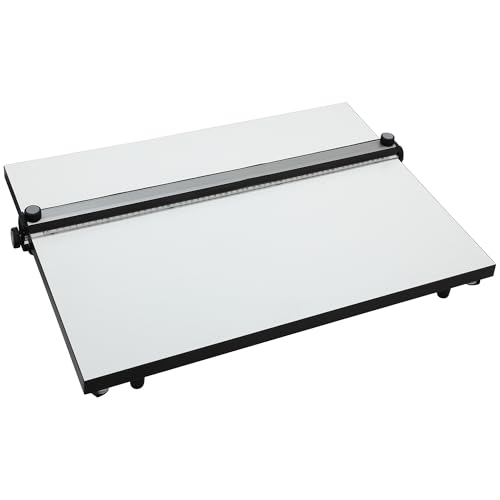
This board offers a fixed 12° angle for steady, repeatable drafting. The laminated surface remains smooth and nonporous, and the parallel motion bar ensures consistent line work. Collapsible rubber feet and grip tracks add stability, helping to maintain precision when working on complex architectural sketches or technical drawings.
Frylr Inch A3 Drawing Board

The Frylr A3 drawing board provides an inch-scale grid and a multifunctional setup that includes a T-square and triangle for 90° accuracy. The board accommodates easy movement along a plastic runner, with a grip-enabled T-square system that locks into position. Its paper locator, tilt feet, and anti-slip support offer stable angles for precise drafting, especially useful for architectural plans and technical illustrations.
Acurit PXB 23” x 31” Drawing Board
This 23” x 31” Acurit model combines a laminated surface, a transparent ruler with inch measurements, and a parallel bar for smooth, accurate drafting. The board supports five adjustable angles, designed to minimize fatigue and maximize accuracy for large-scale drawings, architectural plans, and design renderings.
Acurit PXB 20” x 26” Fixed Angle Board
This compact small-format option features a fixed 12° angle, ensuring stable performance for precise drawing tasks. The laminated surface resists scratches and grooves, and the parallel bar guides straight lines with dependable consistency. Collapsible rubber feet and grip tracks enhance stability on various work surfaces, aiding accuracy and comfort during drafting sessions.
Buying Guide
- Surface durability: Look for laminated nonporous melamine surfaces that resist scratches and dents, ensuring long-term usability in daily drafting tasks.
- Parallel motion bar: A reliable parallel bar helps maintain consistent line work and straight horizontal lines, essential for architectural drawings.
- Angle adjustability: Boards with multiple angles reduce wrist strain and support different drawing tasks, from isometric renderings to plan views.
- Ruler and measurement aids: Transparent rulers with clear inch or centimeter markings streamline precision measurements directly on the board.
- Stability features: Fixed-angle designs or boards with rubber feet, grip tracks, or serrated edges reduce movement while drafting.
- Portability: For those who draft on-site or move work between locations, portable, lightweight boards with carrying handles or compact dimensions are advantageous.
- Size options: Choose dimensions that match your typical projects—smaller boards for quick sketches or larger boards for detailed layouts and full-scale plans.
- Build quality and brand reputation: Established brands like Acurit offer consistent surface quality and reliable hardware, which can reduce maintenance over time.
- Accessory compatibility: Some boards include or support accessory tools (rulers, locking systems, t-squares) that enhance precision and workflow.