Explore reliable self-inking stamps that streamline labeling, marking progress, and organizing paperwork. This guide reviews five top options, highlighting line/color options, impression sizes, and refill capabilities to help you choose the right stamp for busy offices, classrooms, and small businesses.
Summary of Chosen Products
| Product | Brand | Impression Area | Key Benefit |
|---|---|---|---|
| Promot Self Inking 1 Line Custom Stamp | Promot | Small; 9/16″ x 1-1/2″ | Custom one-line text, various ink colors, crisp impressions |
| Promot Self Inking 2 Line Custom Stamp | Promot | Small to large; 9/16″ x 1-1/2″ to 7/8″ x 2-3/8″ | Two-line customization; bold, long-lasting impressions |
| ExcelMark Completed Self Inking | ExcelMark | 9/16″ x 1-1/2″ | Clear mount for alignment; refillable |
| Zeokiar 8-Piece Office Stamps Set | Zeokiar | Multiple sizes per stamp | Comprehensive task status stamps for workflow tracking |
| Promot Copy Self Inking Rubber Stamp | Promot | Various sizes depending on model | Copy stamping for contracts, receipts, and documents |
These options cover single-line personalization, multi-line labeling, durability, and a ready-to-use workflow approach suitable for offices and classrooms. The selection focuses on stamps that clearly mark progress, approvals, or completed tasks, while offering reliable ink systems and easy re-inking or replacement.
Promot Self Inking 1 Line Custom Stamp

Features include a personalized one-line stamp suitable for names, messages, or office labeling. Customers choose a font, with the design team delivering crisp impressions. This self-inking model is refillable and offers an ink color selection in black, blue, green, or red for clear, consistent results. Available in several size options to fit different labeling tasks, from small name tags to larger address labels. The product supports professional use while remaining simple to operate, making it suitable for administrative staff, teachers, and personal labeling.
Promot Self Inking 2 Line Custom Stamp

This two-line stamp expands customization to include two lines of text for names, addresses, or labels. The self-inking mechanism provides sharp prints with long-lasting ink and a choice of ink colors. Three size options (small, medium, large) accommodate various labeling needs, including wedding invitations, branding to packages, or structured office paperwork. The design emphasizes ease of use, repetitive stamping, and a professional appearance across multiple contexts.
Zeokiar 8PCS Office Stamps Set
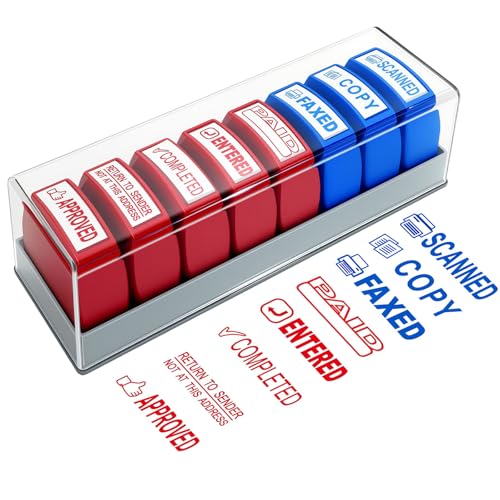
This versatile set includes multiple stamps for common workflow statuses, such as “Paid,” “Approved,” “Completed,” “Return to Sender,” “Copy,” “Faxed,” “Scanned,” and “Entered.” Red ink highlights critical items, while blue ink provides a professional tone for routine documentation. The stamps use oil-based ink for vibrant impressions that resist fading. Durable ABS construction and protective seals help prevent drying, making these stamps suitable for daily office, school, or home use.
ExcelMark Custom Stamp
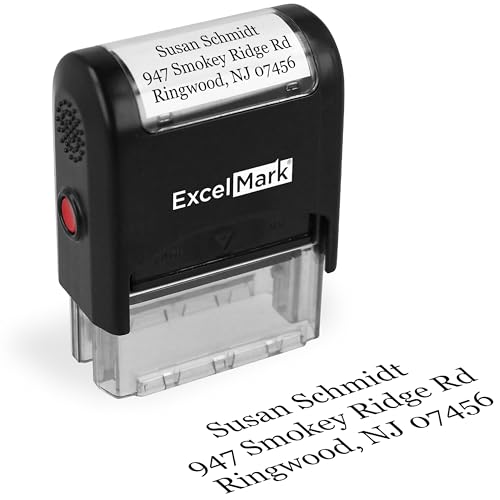
ExcelMark’s custom stamp offers up to three lines of text within a compact 0.5” x 1.5” impression area. It supports 11 ink colors and 17 fonts, enabling personal or professional customization for return addresses or contact details. The stamp features a double-sided ink pad designed to deliver tens of thousands of clear impressions, making it a durable choice for frequent labeling and document organization in a busy environment.
Promot Copy Self Inking Rubber Stamp

This model focuses on copy stamping for office tasks such as contracts, receipts, and invoices. It uses self-inking technology for quick, clean impressions with minimal effort. The stamp is designed for versatility across business, accounting, bookkeeping, coding, and legal contexts, with a clear base to help with precise alignment. Refillable options ensure continued use with reliable output, supporting steady workflow processes.
Promot Entered Self Inking Rubber Stamp

This stamp emphasizes “Entered” labeling for records management and inventory tracking. The self-inking mechanism provides consistent, legible prints and a simple re-inking process. Designed for office productivity, it suits accounting, notary work, and general documentation tasks where a clear “Entered” stamp mark is needed for status updates and filing accuracy.
Buying Guide: Key Purchase Considerations And Comparisons
When choosing a work in progress stamp, consider the following factors to align with your workflow and budget:
- Impression size and readability: Smaller stamps fit tight spaces like envelopes or name tags, while larger stamps make status updates on documents more visible. Check the listed impression area to ensure it matches your typical use case.
- Ink color options and visibility: Red ink is common for urgent or critical tasks, blue for standard workflow, and black for professional documents. Some models offer multiple ink colors; others are limited to a single color per unit.
- Self-inking vs. traditional: Self-inking stamps are convenient and quick, with built-in ink reservoirs. Traditional rubber stamps require an external ink pad and can be less convenient for high-volume stamping.
- Re-inking and replacement pads: Long-term use depends on how easily you can refill or replace the ink pad. Refillable options extend the stamp’s life without needing a new unit.
- Customization and fonts: If you need names, addresses, or personalized messages, check whether the product supports multi-line text and font customization. Some allow font, size, and color choices during order.
- Durability and build quality: Look for sturdy plastic or ABS frames, especially for classroom environments or busy offices where devices may be bumped or moved frequently.
- Multi-pack versus single unit: Sets like the 8-piece office stamp collection may offer bulk efficiency for teams, while single-line units fit tight budgets and simpler tasks.
- Intended use case: Classroom stamps often emphasize playful, clear impressions and alignment windows, while office stamps prioritize precise positioning and consistent impressions for documents and packaging.
In summary, for a “work in progress” workflow, prioritize stamps that deliver clear impressions, reliable ink supply, and easy alignment. Choose options that match your document volume, required readability, and whether you need one-line or multi-line labeling. Consider a mix of stamps for different tasks—one-line labels for quick names, two-line stamps for addresses or project IDs, and status stamps for tracking progress or approvals.