Discover top 3D drawing pens that turn flat sketches into three-dimensional artworks. This guide highlights five user-friendly options ideal for kids, students, and hobbyists, focusing on safety, ease of use, and versatility for various projects. Read on to compare features, performance, and practical tips for choosing the right pen for your needs.
| Product | Brand | Main Focus | Ideal For |
|---|---|---|---|
| SCRIB3D P1 3D Printing Pen | SCRIB3D | Beginner to intermediate, USB power, starter kit | Creative projects, decorations, repairs |
| 3Doodler Start+ Essentials | 3Doodler | Kid-safe design, expanded kit | Screen-free learning, STEM activities |
| MYNT3D Super 3D Pen | MYNT3D | Flow control, durable nozzle | Everyday drawings and crafts |
| SCRIB3D Advanced 3D Pen | SCRIB3D | LCD display, precision, multiple speeds | Advanced models, detailed work |
| MYNT3D Professional Printing 3D Pen | MYNT3D | OLED display, fine-tuning | Professional-grade projects, demonstrations |
SCRIB3D P1 3D Printing Pen With Starter Kit

The SCRIB3D P1 3D Printing Pen offers a versatile platform for drawing, doodling, and building in three dimensions. It supports a stepless speed function to suit both detailed designs and faster infill work. This beginner-friendly kit includes three colors of PLA filament (30 feet), a power adapter, a step-by-step manual, and a stencil guide, making it a ready-to-use option for immediate creative sessions. PLA filament is noted for being easy to handle, which helps new users gain confidence quickly. The red warm-up indicator ensures users know when the pen is ready to draw, and a straightforward feeding mechanism supports smooth operation. This model is well-suited for collaborative projects, artistic decorations, and on-the-go repairs where lightweight, reliable tooling is beneficial.
3Doodler Start+ Essentials 3D Pen for Kids
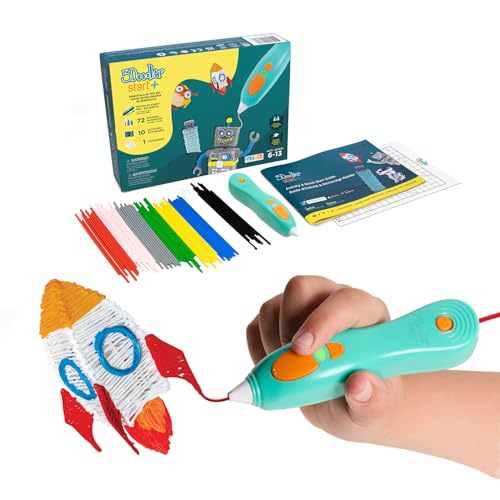
The 3Doodler Start+ Essentials focuses on safety and beginner accessibility. It is designed for kids aged 6+ with no hot parts exposed, reducing burn risks while still enabling dynamic 3D drawing. The kit adds more plastic filaments, an upgraded stencil set, and a safety standby mode to manage heat and flow. A screen-free experience encourages hands-on learning and exploration of STEM concepts through tangible, real-world projects. The combination of safety features and a broader accessory lineup makes this pen especially appealing for classrooms or family art time.
MYNT3D Super 3D Pen

The MYNT3D Super 3D Pen combines accessible controls with improved durability. A stepless speed slider allows users to regulate material flow precisely while drawing, supporting smoother lines and better control on complex designs. The pen features an ultrasonic-sealed nozzle designed to resist clogs, which can extend the life of the unit and reduce maintenance. This model is ideal for hobbyists seeking reliable performance and a comfortable drawing experience with dependable nozzle protection.
SCRIB3D Advanced 3D Printing Pen
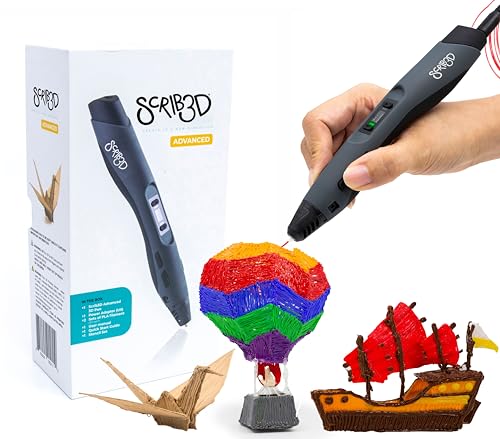
The SCRIB3D Advanced Pen emphasizes precision and comfort, featuring a large LCD display for monitoring temperature and speed. It’s designed as the premium option within the SCRIB3D line, offering eight speed settings, a soft-touch surface, and an ergonomic shape to reduce hand fatigue during long sessions. The kit includes two colors of PLA, a power adapter, a stencil guide, and a manual, enabling users to start creating professional-looking 3D models and prototypes with greater accuracy than entry models.
MYNT3D Professional Printing 3D Pen with OLED Display
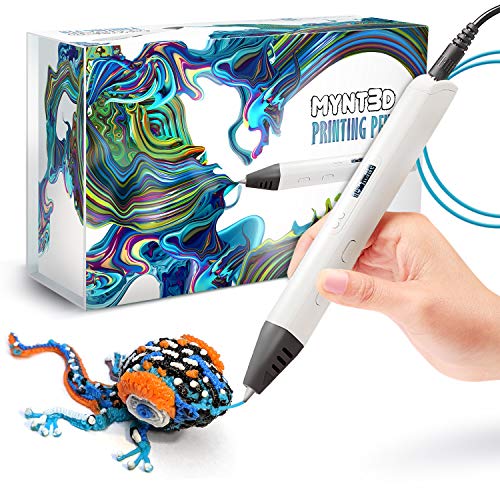
The MYNT3D Professional 3D Pen is designed for serious creators who demand fine-tuning. The OLED display helps users monitor and adjust settings in real time, with an adjustable temperature range and a controlled feed mechanism for precise material flow. This pen is well-suited to demonstrations, prototyping, and more intricate artwork where consistent performance and detailed parameter control are essential for achieving high-quality results.
MYNT3D 3D Pen Mat Kit, DesignPad + FreePad
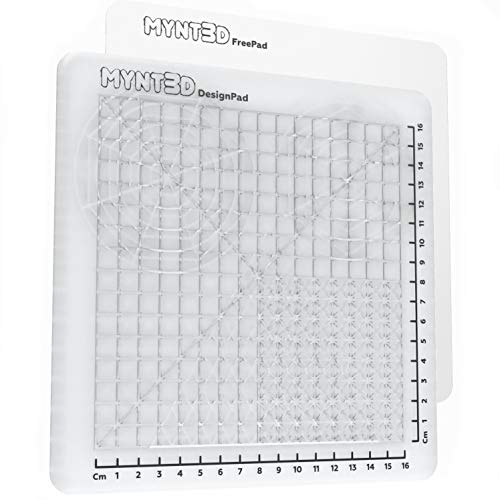
The MYNT3D 3D Pen Mat Kit combines a versatile drawing surface with design accessories. It includes a DesignPad, FreePad, and a variety of templates to guide creativity. The mat helps manage heat and provides a stable workspace, reducing mess and improving adhesion for intricate designs. This kit is valuable for artists who want a dedicated, reusable crafting surface and ready-to-use templates to jump-start projects.
3Dmate Starter – Transparent 3D Pen Mat

The 3Dmate Starter Kit centers on a transparent, two-sided silicone mat designed to provide a stable, heat-resistant surface for 3D pen work. It includes stencils and templates to inspire creativity while protecting work surfaces. The dual-sided silicone design accommodates different projects and helps manage mess, making it a practical addition for beginners and seasoned users alike. This setup supports a versatile crafting experience with accessible templates for varied skill levels.
Buying Guide
- Safety and age suitability: For kids, prioritize kid-safe designs with reduced risk of burns and safety features. Look for no-hot-pparts or safety stands when relevant.
- Filament compatibility: Most pens use 1.75mm PLA or ABS. Check compatibility with your chosen filament brand and the pen’s heater/temperature range.
- Temperature and speed control: Pens with adjustable temperatures and multiple speed settings offer finer control for detailed work and smoother infill.
- Display and monitoring: LCD or OLED displays help monitor temperature, speed, and flow. This is especially useful for advanced projects and prototyping.
- Accessories and kit contents: Starter kits with multiple colors, stencils, and manuals reduce setup time and expand creative options.
- Surface and accessories: A stable surface, mats, and stencil books improve usability and finish quality for both beginners and pros.
- Maintenance and durability: A durable nozzle, clog-resistant design, and easy filament retraction support longer sessions and reduce downtime.
- Learning and learning aids: Consider models with stencil guides, templates, or design guides to accelerate learning and inspire new projects.
- Budget and use case: For classrooms or group activities, prioritize safety and ease of use; for professionals, focus on precision, display features, and reliability.
- Portability and power: USB-powered or wall adapters can affect where you work—consider your preferred setup for home, classroom, or studio use.