Exploring digital paper and pen tools helps you capture ideas with the feel of writing on real paper while enjoying digital convenience. This guide highlights five top options that blend tactile writing with smart syncing, ideal for students, professionals, and frequent travelers. Each product focuses on natural writing experiences, long-lasting battery life, and reliable syncing to apps or cloud storage. Read on to compare features, draw on color or grayscale displays, and discover which setup best fits your workflow.
| Product | Brand | Display Size | Notes |
|---|---|---|---|
| reMarkable Starter Bundle | reMarkable | 10.3″ | Paper-like writing; Marker Plus with eraser |
| reMarkable Paper Pro Bundle | reMarkable | 11.8″ | Color display; premium bundle |
| HUION Note | HUION | 9.5″ | App-based paper experience; audio sync |
| XP-Pen 3 in 1 Color Digital Notebook | XP-Pen | 10.95″ | AG NXTpaper display; 90Hz refresh |
| Digital Pen Writing Set | Yuan | varies | Real-time sync; handwriting to digital |
reMarkable Starter Bundle

The reMarkable Starter Bundle brings the original paper-like tablet experience to daily note-taking. Its 10.3″ black-and-white display emphasizes a distraction-free workflow, with minimal interruptions from apps or notifications. The Marker Plus pen includes a built-in eraser for quick edits, and the device is designed to be ultra-thin and portable at just 4.7 mm. Battery life supports up to two weeks of typical use, enabling extended sessions without frequent recharges. This bundle ships with extra marker tips and a USB-C cable for versatile charging options.
Reference features emphasize the core advantage: a tactile, paper-like feel that prioritizes thinking over scrolling. The absence of an app store or social feeds helps maintain focus during reading, annotation, and drafting. This setup suits students and professionals seeking a pure handwriting-to-digital workflow with dependable battery performance.
reMarkable Paper Pro Bundle
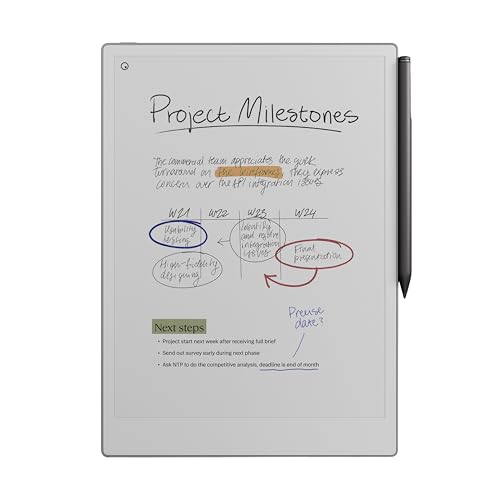
The reMarkable Paper Pro Bundle expands to an 11.8″ color display, offering a broader canvas for writing, sketching, and reading with color. The bundle includes Marker Plus with an eraser, several spare tips, and a USB-C cable, plus a protective Book Folio in mosaic weave. The color display enhances notes and documents while preserving the familiar, paper-like friction that makes the device appealing to writers who want richer visuals without sacrificing the feel of pen on paper.
Users benefit from a refined writing experience designed to work specifically with the color canvas. The Marker Plus provides precise control and responsiveness, supporting long sessions with comfortable ergonomics. This option is ideal for users who need color-coding, diagrams, or highlighted notes integrated into their digital notebook.
XP-Pen 3 in 1 Color Digital Notebook

The XP-Pen 3 in 1 Color Digital Notebook targets a robust writing and drawing experience on a 10.95″ Android tablet. It features multi-color modes (Monochrome LCD, Light Color, Nature Color) driven by an AG nano-etched display with TCL NXTpaper 3.0 technology to reduce ambient light glare. A 90Hz refresh rate delivers smooth visuals and reduces lag during writing and navigation. While not an e-ink device, this tablet emphasizes a natural-feeling surface and vivid color performance for work and study tasks that require quick switching between modes.
Key considerations include the device’s Android-based ecosystem, which supports apps and cloud syncing, alongside a stylus experience designed for precise control and comfortable long-form writing. This option suits users who want color, fast refresh rates, and a flexible platform for mixed media tasks.
Digital Pen Writing Set

The Digital Pen Writing Set from Yuan presents a digital-pen-on-paper workflow with real-time sync. It includes an A5 notebook and mini notebook, paired with software to digitize handwritten notes. The setup emphasizes immediate accessibility on iOS and Android devices, allowing users to securely store and retrieve notes across devices. Real-time synchronization and playback features help users review handwriting, capture ideas, and search for content efficiently. Ideal for classrooms and meetings, this kit provides a practical bridge between analog ease and digital organization.
Ophayapen Smart Pen Writing Set
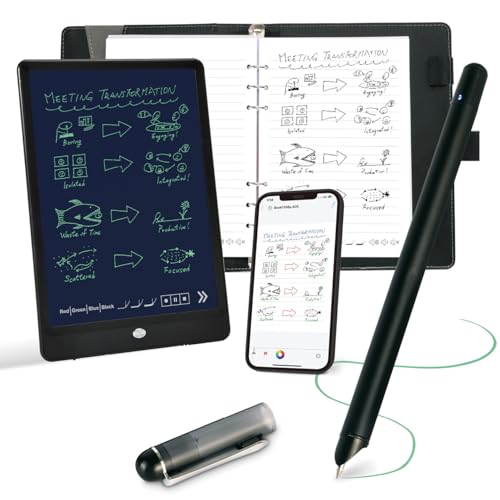
The Ophayapen Smart Pen Writing Set integrates a smart pen, writing board, and accompanying app for real-time digital copies of handwritten notes. The product highlights OCR-based text conversion, enabling searchable notes and easy export to editable documents. Audio syncing is included to capture lectures or meetings with time-aligned notes, enhancing recall and organization. Compatibility with iOS and Android devices broadens usage scenarios for students and professionals who rely on quick digitization and sharing of handwritten content.
reMarkable Paper Pro Bundle Mosaic Weave

This bundle centers on color writing with a mosaic weave Book Folio cover. The 11.8″ Canvas Color display supports vivid color while maintaining a writing experience close to paper. The Marker Plus pen with eraser delivers precise control and a natural friction feel, while the included cover offers protection and a touch of style. It is a strong choice for creative work, diagramming, and color-coded note systems in a portable, premium package.
reMarkable Essentials Bundle

The Essentials Bundle emphasizes uninterrupted writing with a long battery life, avoiding pop-up ads and social distractions. It includes a 10.3″ writing tablet, Marker Plus with eraser, and a Book Folio cover in gray weave. The focus is on extended sessions of reading and note-taking without interruptions, delivering a reliable platform for research, drafting, and annotation tasks where consistent performance matters.
Buying Guide: Key Purchase Considerations
- Display and writing feel: Paper-like friction matters for comfort and natural handwriting. Decide between black-and-white or color displays based on your note-taking needs (sketching, diagrams, or color-coding).
- Pen performance and ergonomics: Look for pens with erasers, responsive latency, line precision, and comfortable grip for long sessions. Consider whether replacement tips are included or available.
- Battery life and charging: Longer battery life reduces downtime. Check charging options (USB-C, magnetic charging) and whether the device supports fast charging.
- Sync and ecosystem: Determine if the device syncs in real time with your preferred apps or cloud services. App compatibility across iOS/Android vs. desktop ecosystems influences workflow integration.
- Storage and expandability: Some models provide built-in storage or cloud options. Consider whether you need additional notebooks, colors, or accessory bundles (covers, folios).
- Distraction level: Some devices minimize notifications and app distractions, preserving focus for reading and note-taking. If you work best with minimal interruptions, prioritize this feature.
- Use case variety: If you require color for diagrams or highlighted sections, color displays and accurate color rendering become important. For simple note-taking, grayscale devices may suffice.
- Portability: Thin profiles, weight, and included carrying cases affect on-the-go use. A compact pairing with a sturdy folio can protect your investment during travel.
- Price and bundles: Bundles with extra pens, tips, and folios can add value, but compare against single-unit options to ensure you’re getting the features you need for your budget.
- Future-proofing: Consider devices with ongoing software updates and broad third-party support to extend usability over time.
In sum, choosing a digital paper and pen setup depends on your balance of tactile feel, display color options, and ecosystem compatibility. The highlighted products offer a range of approaches—from distraction-free grayscale writing to color-rich, app-integrated experiences—so you can identify the best fit for daily journaling, classroom use, or professional drafting. Each choice aims to preserve the feel of writing on paper while unlocking the benefits of digital organization and searchability.