The following guide highlights top digital paper cutting machines and precision trimmers suited for scrapbooking, card making, labeling, and general crafts. These picks emphasize built‑in scanners, automatic blade features, deep cutting capability, and safe designs for home use. Explore five strong options with diverse capabilities to match your project needs and budget. Each section provides a quick look at the product, notable features, and practical usage notes to help you compare at a glance.
| Product | Brand | Key Features | Image |
|---|---|---|---|
| Brother ScanNCut SDX125E | Brother | Built‑in scanner, 682 designs, auto blade with material sensor |  |
| LOKLiK Cutting Machine | LOKLiK | 5‑in‑1 cutter, AI painting, 50k+ designs, no-subscription |  |
| Cricut Joy Xtra | Cricut | Bluetooth, print‑then‑cut, writes, foils; compact and portable |  |
| Evteck 12 Inch Paper Cutter | Evteck | 12″ trim, safety blade, foldable ruler, A4/A3 compatible |  |
| Fiskars Precision Paper Trimmer | Fiskars | SureCut technology, triple-track system, easy blade switching | 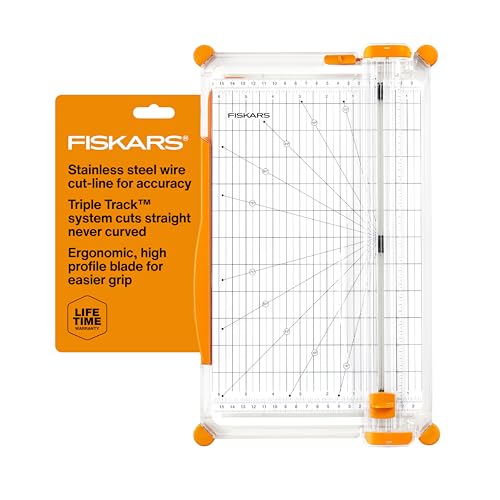 |
Note: This table presents product highlights to facilitate quick comparison. For full details, refer to each product section below.
Brother ScanNCut SDX125E – Built‑In Scanner With 682 Patterns
The Brother ScanNCut SDX125E stands out for its integrated scanner, enabling direct conversion of drawings into cut files. This feature lets users scan printed stickers or hand‑drawn designs and cut them precisely on the mat. With 682 built‑in designs (including quilting patterns and fonts) and wireless capabilities, it supports crafting complex projects without a computer. The 5″ touchscreen simplifies navigation and design adjustments while the auto blade and material sensor technology minimize blade changes and guesswork. Always perform a trial cut to confirm results on your material.
Applications span custom stickers, greeting cards, wall art, and fabric projects. The built‑in library offers a broad starting point, while USB connectivity allows additional patterns. For users who value self‑expression and precise placement, this model provides robust control with a streamlined workflow.
Evteck Paper Cutter 12 Inch – Portable Cutting Tool
Evteck’s 12″ paper trimmer is designed for straightforward, accurate trimming of various sizes including A4 and A3. The blade operates with a safety design to reduce accidental cuts, which is especially helpful for classrooms and home craft spaces. The device is compact and portable, suitable for scrapbooking, photo trimming, and card making. Its foldable structure makes storage simple, while the transparent guide ensures precise alignment. The trimmer handles up to common crafting materials with a thickness limit suitable for typical paper crafts.
Fiskars Precision Paper Trimmer – SureCut & TripleTrack
Fiskars brings SureCut technology to the table, with a stainless steel wire cut‑line and a TripleTrack system that helps prevent curved or wobbly cuts. The trimmer is designed for easy blade switching and extended reach, including a 6.0 mm straight‑cut arm with a maximum 15.6-inch cutting length. This model is ideal for precise card making, scrapbook pages, and general paper crafts. Its straightforward design appeals to hobbyists and educators who prioritize dependable, clean cuts and a simple user experience.
LOKLiK Cutting Machine – 5 in 1, AI Assisted
LOKLiK’s 5‑in‑1 cutting machine integrates deep cutting, scoring, foil printing, writing, and drawing. It supports over 100 materials and includes an AI painting feature for quick design concepts. The system is designed to be user‑friendly, with a focus on craft versatility—from t‑shirts and cards to 3D decor and home accents. A subscription‑free software ecosystem provides access to thousands of designs, with ongoing updates to keep projects fresh. A quiet operation profile helps in shared spaces without disruption.
Cricut Joy Xtra – Compact, Versatile Cutting Machine
The Cricut Joy Xtra is designed for space‑conscious crafters who still want powerful capabilities. It supports cutting, writing, drawing, and foiling, with compatibility to print‑then‑cut workflows via an inkjet printer. Bluetooth connectivity enables wireless operation, and the compact footprint makes it a practical choice for dorm rooms or small studios. The included features and material compatibility (vinyl, HTV, cardstock, and more) expand project possibilities for stickers, decals, and quick custom gifts. It’s a beginner‑friendly option with room to grow into more complex designs.
Buying Guide: Key Purchase Considerations
- Project type and scale: Choose a model that suits scrapbooking, card making, or home decor. If you frequently need to scan drawings, prioritize a built‑in scanner like the Brother ScanNCut.
- Material compatibility: Consider the range of materials supported (paper, vinyl, cardstock, fabric, etc.). Deep cutting and scoring are valuable for multi‑step projects.
- Automation vs. manual control: Auto blade sensors, adjustable guides, and electronic cutting mechanics save time but may come with higher upfront cost.
- Connectivity and software: Bluetooth, USB, and online design libraries affect ease of use and access to designs. Subscriptions may be optional or required for some ecosystems.
- Safety and ergonomics: Look for safety features (blade guards, finger protection) and comfortable handling for long crafting sessions.
- Portability and space: If your workspace is small, compact units—like Cricut Joy Xtra or portable trimmers—are advantageous.
- Maintenance and support: Availability of replacement blades, mats, and reliable customer support affects long‑term usability.
Practical considerations include balancing budget with features. For beginners, a compact device with basic cutting and design options may be preferable, while intermediates may benefit from the versatility of multi‑function machines. For crafters who work with printed designs, a model with a scanner or print‑then‑cut capability can save substantial time. When selecting, map out your typical projects, preferred materials, and the maximum cutting width you’ll need to ensure a solid fit with your workflow.