The market for digital vinyl cutting machines offers a range of features, from compact home devices to industrial-scale plotters. This guide highlights five notable options that align with modern DIY crafting—from vinyl decals and iron-on designs to intricate stickers and signs. Each pick supports multiple materials, enables draw-and-cut capabilities, and pairs with design software to streamline personalization. The table below summarizes key specs to help you compare at a glance.
| Product | Brand | Approx. Cutting Width / Capacity | Notes |
|---|---|---|---|
| Cricut Explore 4 | Cricut | Standard material support; up to 12 in width (cutting area varies by material) | Print-Then-Cut, draws, foils, scores; includes 30 images |
| VEVOR 53 Inch Vinyl Cutter | VEVOR | Max 53.1″ feed; 49.6″ cutting width | Digital control, adjustable pressure/speed, floor stand |
| VEVOR 34 Inch Vinyl Cutter | VEVOR | Max 34.3″ feed; 30.7″ cutting width | LCD display, sturdy drive system, design and cut capability |
| Cricut Joy | Cricut | Smart cuts on 50+ materials | Compact, portable; 30 bonus images; Print-Then-Cut compatible |
| LOKLiK 5-in-1 Cutting Machine | LOKLiK | Thorough multi-function across materials (AI painting, foil, etc.) | Subscription-free IdeaStudio access; quiet operation |
Cricut Explore 4 — Smart Cutting Machine
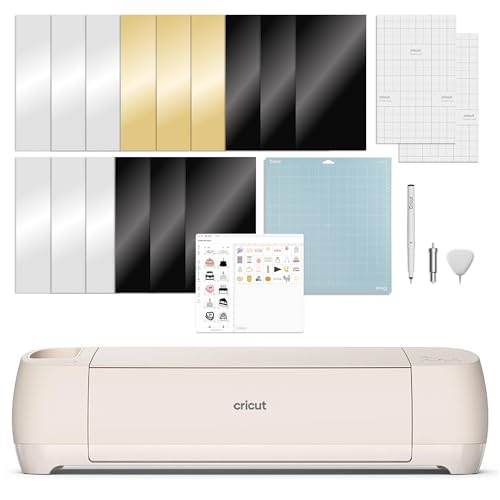
The Cricut Explore 4 is a versatile smart cutter designed for creative personalization across a broad material range, including vinyl and iron-on. This bundle includes the machine, a Fine-Point Blade, a Light Grip Mat, a Fine Point Pen, a Mini Weeder, practice-supplies, and 30 digital images. Notably, it supports Draw, Score, and Foil effects, and its Print-Then-Cut capability enables full-color designs when paired with inkjet printers. Ideal for scrapbookers, sticker makers, and custom apparel projects, it combines cutting precision with drawing versatility.
VEVOR 53 Inch Vinyl Cutter

This large-format vinyl cutter offers a wide cutting width and long paper feed, designed for signs, decals, and complex graphics. It delivers precise cutting with a ±0.01 mm accuracy and supports adjustable cutting pressure (20-500 g) and speed (20-800 mm/s). A robust ARM-based motherboard, stable rollers, and a backlit LCD display make it suitable for home studios or small businesses that require higher throughput and larger output.
VEVOR 34-Inch Vinyl Cutter Bundle

The VEVOR 34-inch bundle combines solid cutting capacity with a reliable control system. With a maximum 34.3″ paper feed and 30.7″ cutting width, it maintains tight tolerances (±0.01 mm) and offers a sturdy architecture with double spring pinch-rollers and a roughened steel roller setup. The machine includes a backlit LCD display for straightforward operation and adjustable cutting parameters, making it a practical option for sign making and large-format decals.
Cricut Joy Xtra Digital Version

The Cricut Joy Xtra expands compact crafting with a strong feature set in a portable form. Beyond simple cutting, it supports drawing and foiling, and comes with a 30-image digital library. It’s designed to handle 50+ materials, including vinyl, cardstock, and iron-on, using Smart Material technology for longer, matless cuts. The bundle includes essential accessories and a welcome card to help users get started quickly.
LOKLiK 2 by HTVRONT — 5 in 1 Vinyl Cutter

The LOKLiK 2 in 1 model emphasizes versatility with five functions in one machine, including fine cutting, writing, scoring, deep cutting, and foil printing (tools sold separately). It’s designed for cost-conscious creators thanks to its no-subscription IdeaStudio access and a robust AI painting feature that helps transform ideas into designs quickly. Aimed at makers who want to experiment with layers and mixed media, it balances capability with affordability and quieter operation.
Buying Guide
- Material compatibility: Most machines support vinyl, iron-on, cardstock, and stickers. Check exact material lists to ensure your preferred projects are supported.
- Cutting width and throughput: Large-format cutters are ideal for signs and decals, while compact models suit home crafts. Consider max cutting width, feed length, and speed for your typical projects.
- Tooling and features: Look for blade types, drawing pens, foil tools, and features like Print-Then-Cut or built-in scanners, if relevant to your workflow.
- Software ecosystem: A broad library of images and templates saves time. Some brands offer free digital content bundles, while others rely on third-party design apps.
- Noise and space requirements: Larger units may require dedicated workspace and can generate more noise. If you share a living area, consider models with quieter operation.
- Upgrade or subscription options: Some systems offer ongoing content subscriptions; others provide free libraries. Assess ongoing costs beyond the initial purchase.
- Support and availability: Check warranty terms, customer support accessibility, and availability of replacement parts or blades in your region.