Discover the best pen tablets and pen displays for digital drawing, sketching, and design. This guide highlights five top options that balance drawing precision, portability, and ease of use across Windows, Mac, and Android. Each product integrates advanced stylus technology, responsive input, and user-friendly features for artists at every level.
Summary of chosen products:
| Product | Brand | Key Feature |
|---|---|---|
| XPPen Artist13.3 Pro Drawing Tablet with Screen | XP-Pen | Fully laminated display with tilt brush support and wide color gamut |
| XP-Pen StarG640 | XP-Pen | Battery-free stylus; compact and portable |
| XPPen Deco 01 V3 | XP-Pen | High 16K pressure levels; Android compatibility |
| Wacom Intuos Small | Wacom | Industry-leading EMR technology with versatile software support |
| HUION Inspiroy H640P | HUION | Compact drawing area with 8192 pressure levels and hot keys |
XPPen Artist13.3 Pro Drawing Tablet With Screen

The Artist13.3 Pro from XP-Pen is a 13.3-inch drawing tablet with a full-laminated display. It features up to 60 degrees tilt support for natural shading, and a color gamut measured around 88% NTSC with sRGB ≧123% for vibrant color representation. The 178-degree viewing angle helps reduce color distortion during long sessions, while 8192 levels of pen pressure provide nuanced line control. This model requires connection to a computer via the included 3-in-1 cable, making it suitable for artists who want a self-contained drawing monitor with direct pen input.
Designed for creators who demand brush-like dynamics, the tilt function allows shading without constantly adjusting software settings. The combination of high color accuracy and responsive input helps deliver smooth transitions in inking, shading, and texturing. The Artist13.3 Pro is well-suited for illustration, concept art, and detailed line work where immediate feedback matters.
XP-Pen StarG640 Digital Graphic Tablet

The StarG640 offers a compact 6×4 inch drawing area with a battery-free stylus for uninterrupted drawing sessions. The absence of a need to charge the pen keeps workflows simple and efficient, making it a strong choice for students, educators, and professionals who value portability. Its compatibility with Windows, Mac, and Chrome OS expands its usefulness for online classes, remote work, and quick note-taking. The slim profile makes it easy to slide into a bag for on-the-go use, while the advanced pen technology supports precise control in digital illustration and handwriting tasks.
With a focus on ease of use, this tablet is ideal for getting started with digital art, taking handwritten notes, or adding signatures. The battery-free stylus and compact form factor enable a natural drawing feel without the overhead of a larger setup. It’s a practical bridge between traditional drawing and modern software tools.
XPPen Deco 01 V3 Drawing Tablet

Deco 01 V3 introduces 16,384 pressure levels and tilt sensitivity for nuanced drawing and shading. The battery-free stylus provides a natural pen-on-paper experience without charging interruptions. With eight customizable shortcut keys and broad Android compatibility (Android 10 and up), the Deco 01 V3 offers flexible workflows for beginners and hybrid mobile users. Its compact 10×6 inch working area is comfortable for extended sessions, and Android mapping ensures that artists can sketch directly on compatible devices with appropriate apps.
This model emphasizes ergonomic design and ease of use, making it accessible to newcomers while still offering features appreciated by more experienced artists. The combination of high pressure sensitivity, tilt, and customizable shortcuts supports faster, more intuitive creative processes across a range of software, including painting, illustration, and teaching contexts.
Wacom Intuos Small Graphics Tablet
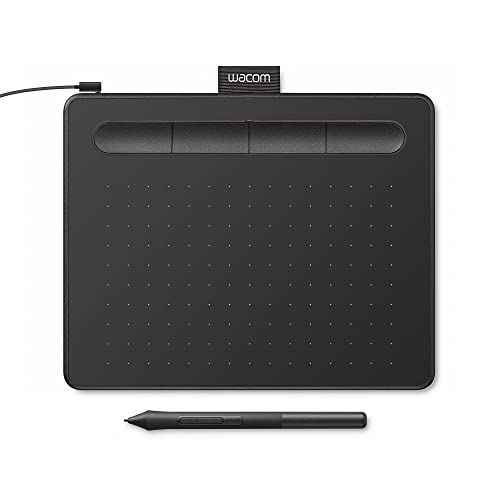
The Wacom Intuos Small relies on EMR technology to deliver a pen-on-paper feel with battery-free precision. It’s widely supported across software platforms, enabling seamless work in Photoshop, Illustrator, and many others. The device’s compact size and reliable performance make it a dependable option for students, hobbyists, and professionals who prioritize consistency and compatibility. The Intuos family is often praised for its mature driver software, which facilitates easy setup and customization of express keys for different tasks.
Wacom’s reputation in the industry rests on pen technology that many professionals trust. This model offers a balanced blend of usability, cross-software compatibility, and sturdy performance for everyday digital drawing, photo editing, and lightweight design tasks. It’s especially suitable for artists seeking a dependable, long-term tool with broad ecosystem support.
HUION Inspiroy H640P

The H640P offers a compact 6×4 inch drawing area and 8192 pressure levels for precise control. It includes six hot keys that can be customized to streamline common tasks, enabling efficient workflows across drawing, writing, and design work. The slim profile and lightweight body enhance portability, making it suitable for traveling artists, students, and remote workers who need a capable tablet without bulk. The included PW100 battery-free stylus matches the performance expectations of approach-to-intermediate artists seeking tight control and natural line work.
With its balanced feature set and friendly price-to-performance ratio, the Inspiroy H640P is a practical choice for those entering digital art or upgrading from an entry-level device. The combination of portability, responsive pen input, and customizable shortcuts supports a broad range of creative activities, from illustration and handwriting to quick diagrams and design ideation.
Buying Guide: Key Purchase Considerations
- Display vs. tablet: If you want a screen to see your artwork in real time, consider pen displays like XP-Pen Artist13.3 Pro or XP-Pen Artist12. For pure drawing tablets, models like Wacom Intuos or Huion Inspiroy provide excellent input without a display.
- Pen technology and pressure: Look for tablets with at least 8,192 levels of pressure and tilt support for more natural shading. Battery-free stylus options reduce downtime and charging chores.
- Compatibility: Confirm OS support (Windows, macOS, Android) and software ecosystems you rely on (Photoshop, Illustrator, Clip Studio, etc.). Android compatibility is a bonus for mobile workflows.
- Shortcuts and workflow: Customizable express keys help speed up common tasks. Determine whether you prefer physical buttons and palm rejection for comfortable long sessions.
- Portability and size: Smaller tablets are highly portable but may limit drawing space. Larger displays offer more room for detail but reduce portability.
- Future-proofing: Consider models with active development, driver updates, and strong customer support to ensure long-term usability.
- Budget and use case: Beginners often benefit from starter kits with bundled software or accessories, while professionals should prioritize color accuracy, display fidelity, and precision.
When selecting a pen tablet, align the choice with your typical workflow: on-screen drawing and shading demand a display and tilt sensitivity, while portable note-taking or education-focused tasks favor compact, battery-free styluses. Consider starting with a proven brand that offers robust drivers and reliable support to maximize long-term value.