The following logo sticker maker machines are popular choices for small businesses seeking fast, inkless labeling. This guide highlights five top options, detailing printing capabilities, templates, and app features to help you decide which model best fits your branding needs. Each product section includes a quick link to the Amazon listing for easy comparison.
| Product | Brand | Label Width Range | Notable Feature |
|---|---|---|---|
| Nelko Label Maker PM220 | Nelko | 23–54 mm | Bluetooth printing with templates and多-language support |
| Phomemo M110 | Phomemo | 20–50 mm | 300+ templates; OCR text recognition |
| LECHPRO Label Makers | LECHPRO | 3/4″–2″ (approx. 19–54 mm) | Portable 2-inch printer with broad suitability |
| Ponek M100 | Ponek | 0.78″–2″ (20–50 mm) | 5,000+ icons and 300+ templates |
| NIIMBOT B21 | NIIMBOT | 0.8″–2″ (20–50 mm) | High-res output with image recognition |
Introduction
Logo sticker printers offer quick, inkless labeling perfect for product packaging, branding, and organization. The machines listed below are designed for small businesses, with Bluetooth or USB connectivity, a library of templates, and support for multiple label sizes. Review each option’s app ecosystem, template depth, and compatibility with iOS, Android, and PC to match your brand strategy and workflow.
Nelko PM220: Bluetooth Label Printer

The Nelko PM220 supports iOS, Android, and PC connectivity via a dedicated app and software. It comes with label templates and the ability to create custom templates, including QR codes, barcodes, tables, time entries, icons, and more. The device prints using direct thermal technology with 23–54 mm label width, and the label tape is included. It integrates a robust app experience with more than 90 fonts and 14+ languages, enabling designers to craft branded labels aligned with product lines. Users should avoid tearing the green back sticker on the label tape to ensure printing quality, and users are advised to calibrate the printer before use.
Phomemo M110: Thermal Label Printer

The Phomemo M110 offers over 300 templates within its app, suitable for clothing, price tags, address labels, folders, and more. It supports label widths from 20 to 50 mm and uses thermal printing to eliminate ink costs. The device pairs quickly, with one-click printing via the app. OCR capability allows recognition and conversion of text from images into editable text, streamlining label creation for small businesses. Note that it is designed for thermal, monochrome output, and is not ideal for shipping labels that require larger formats.
LECHPRO 2-Inch Label Maker
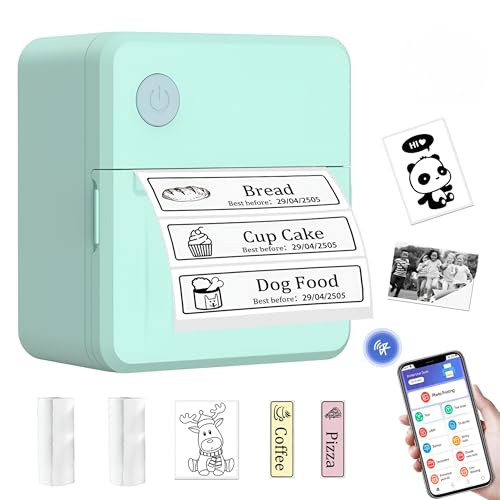
LECHPRO’s portable two-inch label printer emphasizes on-the-go labeling for small business needs, including product branding, barcodes, QR codes, and address labels. It supports label widths from 3/4 inch to 2 inches and is designed to work with smartphones via Bluetooth. Its compact form factor makes it a practical option for labeling on shelves, packaging, and office organization. The device emphasizes a lightweight design and broad compatibility with common label formats, making it versatile for various branding tasks.
Ponek M100: Icon-Rich Label Maker
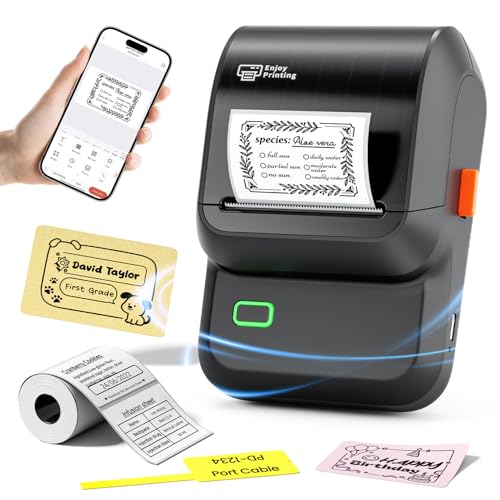
The Ponek M100 is designed for both home and business labeling with a large selection of templates and icons (over 5,000 icons, 300 templates, and 300 fonts). It supports label widths from 0.78″ to 2″ and includes 1.57″ x 1.18″ white labels in the package. Bluetooth pairing with mobile apps (Print Master) and USB connection for PC provide flexible workflow options. The app offers extensive customization, including borders, tables, and QR codes, making it suitable for price tags, product labeling, and organizational tasks. This model emphasizes broad compatibility and a robust library of design assets.
NIIMBOT B21: Inkless Label Printer

The NIIMBOT B21 is an inkless, Bluetooth-capable label printer designed for small businesses and gifting. It supports 0.8″–2″ label widths and features enhanced image quality in its app for precise labeling. The device emphasizes energy efficiency, with a battery that can support multiple hours of operation and an automatic shutdown after 15 minutes of inactivity. It positions itself as a cost-saving option due to thermal printing, reducing ongoing consumable costs compared to ink-based systems. The B21 is suitable for a range of labeling tasks including clothing, jewelry, and packaging.
Buying Guide
Key purchase considerations
- Label width and compatibility: Choose a model that covers your target label sizes (0.78″–2″ is common for small business needs). Ensure the printer supports the label stock you plan to use.
- Connectivity and apps: Look for Bluetooth with a robust companion app, plus optional USB/PC support if you frequently design on a desktop. App templates, fonts, and multilingual options impact branding versatility.
- Templates and design assets: A large library of templates, icons, fonts, and QR/barcode capabilities can reduce design time and improve consistency across labels.
- Print technology and cost: Thermally printed labels avoid ink or toner costs. Consider the long-term cost of label tape or paper and whether the device uses direct thermal or thermal transfer.
- Image and text quality: Higher resolution output and OCR features help with legible branding and accurate data capture on labels.
- Portability vs. productivity: Smaller units are convenient for in-store labeling and on-the-go use, while larger units may offer faster print speeds and a bigger template library.
- Learning curve and support: Evaluate setup complexity, driver availability, and official support resources to minimize downtime during deployment.
Design perspectives
- Brand consistency: A device with many fonts and templates helps maintain uniform logo usage across labels and packaging.
- Workflow integration: Apps that sync with cloud storage, spreadsheets, or product catalogs can streamline batch label production for product lines.
- Maintenance and reliability: Direct thermal printing is maintenance-light but tape quality and calibration can influence durability of labels in storage or shipping environments.