Explore top machines that make stickers, from compact handheld units to all-in-one printers. This guide covers options for kids’ craft time, teachers, small businesses, and hobbyists who want clean, quick, mess-free results. Each product features user-friendly operation, minimizes setup, and delivers durable stickers with reliable adhesives or water-fast prints. Read on to compare capabilities, output quality, and ideal use cases to help you choose the right sticker-making machine for your projects.
| Product | Brand | Best For | What It Delivers |
|---|---|---|---|
| Xyron Create-a-Sticker 5″ | Xyron | Small business and DIY crafts | Non-electric, hassle-free stickers with permanent adhesive |
| Liene PixCut S1 | Liene | All-in-one printing and cutting | AI-assisted auto-cutting with 300 DPI dye-sublimation prints |
| Hello Blink Sticker Maker | CEACO | Kids’ crafts and portable sticker printing | Mini, Bluetooth-enabled, pocket-sized fun |
| Xyron Create-A-Sticker Mini | Xyron | Portable sticker making | Compact, non-electric, instant adhesive |
| HKHKPI Mini Sticker Printer | HKHKPI | On-the-go personal stickers | Thermal, inkless printing with Bluetooth |
Note: This article highlights five relevant options that align with the “machines that make stickers” theme, focusing on ease of use, versatility, and safe, clean results. Each product section below provides specifics to help you compare features, durability, and suitability for your creative workflow.
Xyron Create-a-Sticker 5″ Sticker and Label Maker

The Xyron 5″ Create-A-Sticker operates without electricity, delivering instant results with a simple, non-electric process. It has no warm-up or dry time, so users can create stickers quickly and repeatedly. The device accepts photos, ribbons, craft foam, fabric, and paper, making it versatile for home, classroom, or small-batch business projects. Its adhesive is acid-free, non-toxic, and safe for photos, offering a mess-free alternative to liquids and tapes. The user turns a knob and tears off a ready-to-use sticker, keeping your workspace tidy and efficient.
Best suited for rapid, on-demand sticker production where clean, durable results are essential. The compact design fits compact workspaces or travel setups, and the strong adhesive pairs well with various surfaces. For educators, crafters, or boutique makers who need reliable output without electrical dependence, this model provides dependable performance with minimal maintenance.
Liene PixCut S1 Color Sticker Printer & Cutting Machine

The PixCut S1 combines high-resolution printing and precise AI-assisted auto-cutting in one device. It supports Bluetooth connectivity for smartphone-based workflows, allowing edits, prints, and cuts directly from a mobile app. With AI image extraction, the system identifies subjects in photos and guides the cutting path for accurate edge-following. Thermal dye-sublimation yields vibrant 300 DPI prints with a broad color gamut, delivering professional-level stickers suitable for photos, labels, and gifts. This all-in-one solution is ideal for quick turnaround and polished results.
Consider this option if you want an integrated print-and-cut workflow that minimizes steps and maximizes consistency. The AI-driven edge-following reduces manual trimming, while high color fidelity ensures professional-looking stickers. It’s well-suited for small businesses, crafters, and parents who want classroom-ready outputs with professional polish without multiple machines.
Hello Blink Sticker Maker By CEACO

The Hello Blink sticker maker is a portable, kid-friendly device designed for easy on-the-go fun. It pairs with mobile devices via Bluetooth and focuses on quick, colorful sticker production. The included kid-friendly sticker pack integrates with the device’s flow, offering a simple, intuitive printing experience for children and adults alike. The design emphasizes portability and ease of use, making it a suitable option for classroom activities, family craft nights, or gifting to young creators.
Ideal for users seeking a compact, battery-powered printing option with straightforward operation. It’s especially appealing to families, teachers, and hobbyists who want a light, versatile tool for playful projects. Keep expectations aligned with its portability and basic color-print capabilities, which are perfect for decorative stickers and simple labels rather than high-volume production.
Xyron Create-A-Sticker Mini 2.5″ Sticker & Label Maker

The Xyron Mini 2.5″ offers the same quick, non-electric workflow as its larger counterpart, but in a compact format. It’s designed for fast, clean sticker production with a permanent adhesive that’s safe for photos and crafts. The device supports a wide range of materials—photos, ribbons, craft foam, fabric, and paper—making it ideal for small, personal projects, school activities, and on-the-go creativity. Its portable nature makes it easy to carry to classes, events, or craft fairs.
Best for users who need a pocket-size solution without electrical power requirements. It’s particularly useful for scrapbooks, card making, or small batch labeling where quick application and minimal mess matter. As a low-maintenance option, it’s a reliable companion for hobbyists and students who value simplicity and portability over heavy production capacity.
HKHKPI Mini Sticker Printer Thermal Sticker Maker
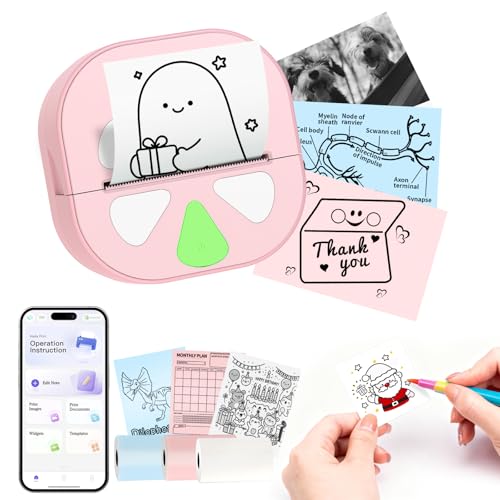
The HKHKPI Mini Sticker Printer uses thermal printing, delivering crisp text and graphics without ink. Bluetooth connectivity enables wireless printing from mobile devices, and the built-in rechargeable battery supports numerous prints per charge. The Nada Print app provides fonts, borders, and icons for easy customization, with waterproof, oil-resistant, and highly adhesive sticker material. This pocket-sized option emphasizes versatility, portability, and mess-free operation for spontaneous labeling, journaling, or gifting projects.
Choose this model for a compact, battery-powered solution that works well for quick notes, labels, and personal stickers. The thermal process means no ink cartridges to replace, and the app ecosystem helps users explore design options quickly. It’s a practical choice for students, travelers, and hobbyists who value convenience and flexibility in a small device.
Buying Guide: Buying Considerations For Sticker-Making Machines
When selecting a sticker-making machine, consider how you plan to use it. Here are key factors to guide decision-making:
- Output format and durability: Non-electric devices produce pre-glued, removable stickers, while printers create high-quality printed stickers with various finishes. Choose based on whether you need simple labels or photo-grade stickers.
- Portability: Compact devices excel for travel, classrooms, or craft fairs. Larger models may offer more features but require a dedicated workspace.
- Materials supported: Some machines handle photos, fabric, foam, or ribbons; others focus on paper or label media. Ensure compatibility with your typical materials.
- Adhesive type: Permanent versus removable adhesives determine how long stickers stay in place and how easily they remove. Consider surface compatibility and project duration.
- Print quality and color: If you require vibrant photos or detailed graphics, look for high DPI or dye-sublimation capabilities. For simple labels, standard color output may suffice.
- App and software: For AI-assisted or smartphone-connected devices, app usability influences workflow efficiency. Check compatibility with iOS and Android and whether editing features meet your needs.
- Maintenance and cost: Non-electric units reduce maintenance but may require more manual handling. Printer-based devices incur ongoing ink or dye-sub media costs—factor these into total ownership cost.
- Safety and age suitability: For kids’ use, consider ease of use, safety features, and whether the device is age-appropriate with guided activities or parental controls.
Overall, the best choice depends on your balance between portability, print quality, and the volume of stickers you expect to produce. For quick, mess-free projects, non-electric models are ideal. For higher-volume or photo-rich stickers, a printing-and-cut all-in-one may deliver greater efficiency and professional results. Always verify the adhesive compatibility with your intended surfaces and confirm that the device aligns with your workspace and budget.