Print on demand laser engraving invites hobbyists and small creators to customize wood, acrylic, leather, metal, and more with precision and speed. This guide highlights five top options for American buyers, focusing on reliability, ease of use, and compatibility with common design software. Whether you’re branding gifts, personalizing décor, or prototyping product ideas, these machines cover a range of power, speed, and versatility to fit different projects and budgets.
| Product | Brand | Output Power | Working Area | Key Strength |
|---|---|---|---|---|
| Carverall K15 Pro | Carverall | 5W | 200×300 mm | Ultra-precision engraving up to 0.01 mm with fast speeds; broad material compatibility |
| Acmer S1 | ACMER | 2.5W | 130×130 mm | Beginner-friendly with preassembled design and precise 0.01 mm positioning |
| ACMER S1 (Higher Power) | ACMER | 2.5W / 3.5W / 6W options | Varies by model | Versatile engraving and cutting for multiple materials; compact and portable |
| CREALITY FALCON 10W | CREALITY | 10W | Various (rotary kit included) | High-power cutting with rotary capability for cylindrical objects |
| Comgrow Z1 | Comgrow | 5W | Large working area (15.7″ x 15.7″) | Robust software compatibility and flexible data transfer options |
Note: This article focuses on laser engraving machines suitable for print on demand workflows, including personalized gifts, product prototypes, signage, and small-batch custom items. All devices support common design workflows, and each entry below provides a practical view of capabilities and usage considerations.
Carverall K15 Pro 5W Laser Engraver
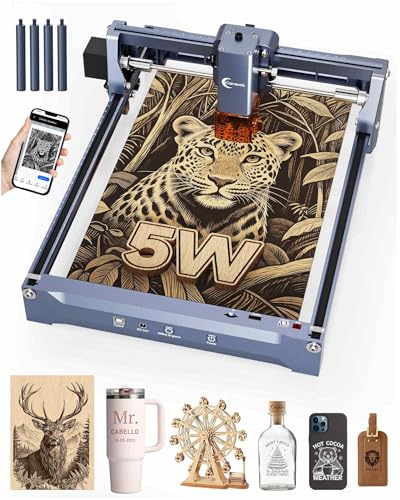
The Carverall K15 Pro is marketed for beginners and DIY enthusiasts who want high accuracy without a complicated setup. The machine advertises a true 5W output and a remarkable 0.01 mm ultra-precision with speeds up to 15,000 mm/min, enabling detailed jewelry, gifts, and decor designs. Its compatibility extends to a broad array of substrates—wood, coated metal, acrylic, leather, and more—making it a strong candidate for diverse print on demand tasks. A notably simple assembly process is highlighted, with six screws and plug-and-play readiness that reduces setup friction. The device supports CutLabX, LightBurn, and LaserGRBL, and ships with safety glasses and test materials, aligning with safe, beginner-friendly workflows.
Key considerations: Power claims in laser engraving can vary in real-world use; users should verify cooling performance and ventilation for continuous operation. The integrated software support is advantageous for those who already use LightBurn or LaserGRBL, but evaluating driver compatibility with existing hardware and OS versions remains important. The 200×300 mm work area is ample for small to medium projects, and the device claims clean cuts through wood and acrylic up to several millimeters in thickness.
12 Piece Color Acrylic Sheet Set for Laser Projects
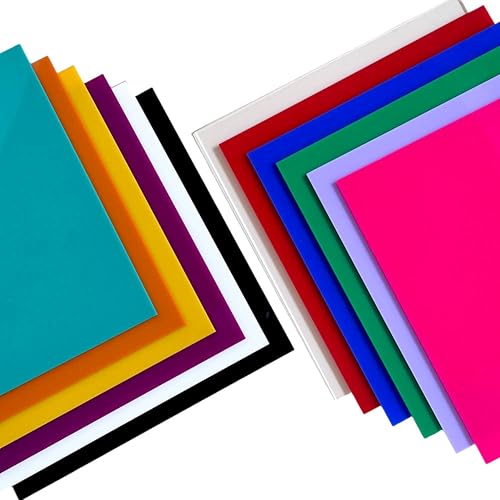
While not a machine, this set of color acrylic sheets is a practical companion for print on demand laser engraving. The 2.7–3.0 mm thickness range, twelve vivid colors, and UV-resistant coatings provide a versatile substrate library for test engravings, samples, and finished display pieces. The sheet’s smooth surface and impact resistance help achieve clean, consistent results on experiments, prototypes, and batch runs. For users printing custom signs, decor panels, or gift tags, this material can expand design possibilities and color options, particularly when paired with a reliable laser engraver.
Acmer S1 Laser Engraver Machine (2.5W)

The Acmer S1 is positioned as a beginner-friendly option with a preassembled design and straightforward setup. It offers a 2.5W diode laser system with a 130×130 mm working area and a positioning accuracy claimed at 0.01 mm. The unit emphasizes ease of use, with a focus on quick installation—just 1 minute for the laser head and focusing. It supports dual engraving and cutting capabilities across materials like wood, leather, plastic, and coated metals. The compact footprint makes it suitable for home workshops and makerspaces where space is at a premium. Compatibility with LightBurn and LaserGRBL ensures broad software support for users at varying skill levels.
ACMER S1 Laser Engraver for Beginners (2500mW)

This variant of the ACMER S1 emphasizes entry-level accessibility with multiple power options up to 6000 mW, offering 2.5W, 3.5W, or 6W selections in some listings. It highlights high-resolution engraving with a 0.04 x 0.04 mm spot and a maximum speed of 10,000 mm/min. The 5.1×5.1 inch (approximately 130×130 mm) working area makes it suitable for small parts and detailed engravings. The device is designed to be compact and portable, appealing to hobbyists who need a space-saving solution. Software compatibility with LightBurn and LaserGRBL further supports a broad user base, including those who want a quick, efficient workflow for DIY projects.
Comgrow Z1 Laser Engraving Machine 5W
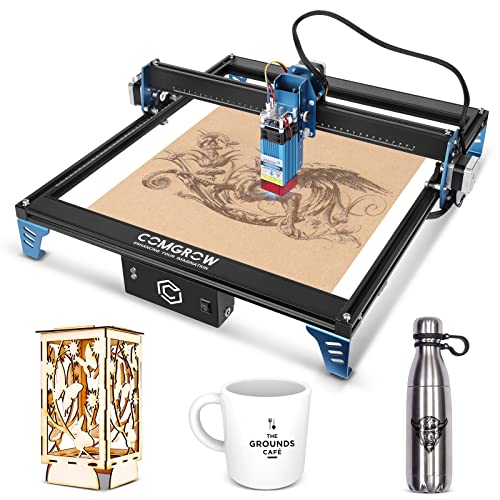
The Comgrow Z1 pairs a 5W laser with a substantial 15.7″ x 15.7″ working area and a 24V configuration. It emphasizes a strong balance of power and control, enabling engraving and cutting of wood, metal, acrylic, glass, and leather with a 0.08 mm spot size for precise results. The Z1 integrates flexible software compatibility with LightBurn and LaserGRBL, and supports multiple data transfer methods (Wi-Fi, USB, SD card). This model targets users who want a larger workspace for bigger projects while retaining practical software options for both veteran and novice operators. The dual Y-axis design contributes to stable engraving at higher speeds.
Buying Guide: Key Purchase Considerations for Print On Demand Laser Engraving
- Power and material capability: Higher wattage generally expands cutting depth and material compatibility (e.g., wood, acrylic, leather, coated metals). Consider your typical project thickness and substrates when choosing power levels of 5W, 10W, or higher.
- Working area: A larger bed enables bigger pieces, batch runs, or sign panels. Balance space in your workspace with the desired project size.
- Precision and repeatability: Look for stated engraving accuracy (e.g., 0.01 mm) and repeatability figures. Stable rails, good focus mechanisms, and consistent autofocus behavior impact long-term results.
- Software and ecosystem: Compatibility with LightBurn, LaserGRBL, and other popular tools is valuable. Ensure drivers, firmware updates, and offline capabilities meet your workflow needs.
- Safety features: Eye protection, emergency stop, and proper ventilation are essential. Class 4 lasers require careful safety practices and appropriate enclosures or fume extraction.
- Ease of assembly and maintenance: Preassembled units save time and reduce setup errors. Check for tool-free adjustments, clear manuals, and accessible spare parts.
- Community and support: A robust user community, reliable customer support, and readily available replacement components can shorten learning curves and keep production moving.
- Expansion options: Some machines include rotary attachments or upgrade kits to handle cylindrical objects or larger volumes. If your work includes gifts, tumblers, or signage, consider a model that supports rotary engraving.
- Pricing and total cost of ownership: Beyond the initial machine price, factor in software subscriptions, replacement laser diodes, safety gear, and consumables for sustained use.
For print on demand, it is common to start with a mid-range power device to evaluate your design throughput, then scale up with heavier duty models or larger working areas as demand grows. Always verify that your selected machine aligns with local safety standards and that you have adequate ventilation and protective eyewear before operating any laser engraver.