For makers, teachers, and creatives, a sticker cutter can transform ideas into polished works—whether you’re labeling projects, creating decals, or designing custom gifts. This guide reviews five top sticker cutter options, highlighting features, connectivity, material compatibility, and ease of use to help you pick the right tool for home, classroom, or small business needs.
Summary table of selected products:
- Likcut Glee S501 – Portable smart cutter, 46+ materials, beginner friendly
- Xyron Create-a-Sticker – 5″ no-heat, no-electric, quick adhesive sticker maker
- Cricut Joy Xtra – 50+ materials, draw/foil options, Print-Then-Cut compatibility
- LOKLiK Cutting Machine 2 – 5-in-1, 0.5 mm precision, AI painting
- Likcut S41 – 3-step workflow, dual connectivity, 0.2 mm precision
Likcut Glee S501 Smart Sticker Cutter

The Likcut Glee S501 is a compact pink DIY smart cutting machine designed for crafters who want a ready-to-use solution. It supports cutting over 46 materials, including vinyl, cardstock, iron-on transfers, and matless smart materials, delivering precise, clean cuts for a wide range of projects. The device emphasizes ease of use for beginners while offering enough versatility for more elaborate crafts in home, school, or party settings.
Key features include portable form, straightforward operation, and suitability for family projects or classroom assignments. It integrates with intuitive software that guides users through cutting steps, creating an accessible entry point for those new to vinyl and paper craft workflows.
Xyron Create-a-Sticker, 5″ Sticker and Label Maker

The Xyron Create-a-Sticker 5″ offers a quick, non-electric solution for producing stickers and labels. No warm-up or dry time is required; simply feed photos, ribbon, fabric, or paper, turn the knob, and tear to apply. It uses an acid-free, non-toxic adhesive suitable for photos and crafts, helping to keep workspaces tidy with a mess-free approach to sticker making.
Benefits include rapid results, easy operation for a variety of materials, and a clean, adhesive-backed outcome without spray or glue. It’s well-suited for classroom activities, quick gift tags, and small business labeling needs where simplicity and speed matter.
Cricut Joy Xtra Smart Cutting Machine

The Cricut Joy Xtra expands creative possibilities with 50+ materials, including vinyl, iron-on, cardstock, and stickers. In addition to cutting, the machine can draw and foil, increasing the range of detailed personalized designs. A Print-Then-Cut feature enablesFull-color sticker designs when paired with an inkjet printer, enhancing visual impact for labels, decals, and gift tags.
No extensive design experience is required thanks to Design Space’s library of images and fonts. The Joy Xtra supports easy setup, delivering a versatile option for classrooms, home craft spaces, or small businesses looking to add professional touches to projects.
LOKLiK Cutting Machine 2 by HTVRONT

The LOKLiK Cutting Machine 2 offers a 5-in-1 toolkit designed for versatility in vinyl cutting, writing or drawing, deep cutting, scoring, and foil printing (tools sold separately). It connects via a subscription-free software, offering access to over 50,000 designs and fonts, along with an AI painting feature that speeds up creative drafting. The machine emphasizes precise, quiet operation with improved motor control to minimize waste and noise during longer runs.
Designed for DIYers and educators, this model supports a broad range of crafts—from t-shirt designs to cards and home decor—making it a strong choice for multi-material projects and ongoing creative experimentation.
Likcut S41 Vinyl Cutter Machine
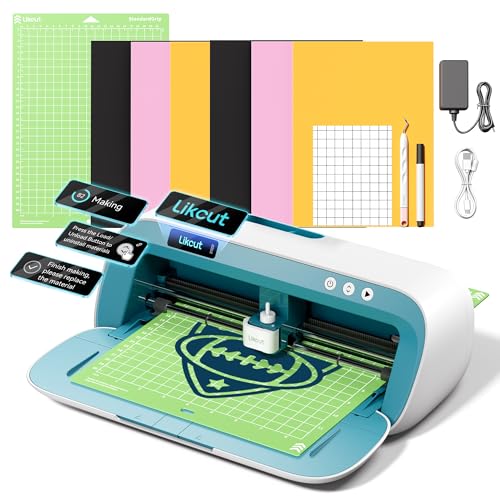
The Likcut S41 is designed as an essential starter bundle forDIY crafts, offering a streamlined 3-step workflow and a dual-mode connectivity setup for stability and ease of use. The micro-precision control system delivers 0.2 mm accuracy, with sensor-assisted calibration that helps maintain accurate cutting paths. This model targets beginners and students seeking consistent results with a simplified setup.
With a focus on room decor, HTV projects, and paper crafts, the S41 supports quick learning curves while maintaining room to grow into more complex designs as skills develop and project needs expand.
Buying Guide: Key Considerations for Sticker Cutter Buyers
- Material compatibility: Check whether the cutter supports vinyl, cardstock, iron-on, and specialty materials you plan to use. A broader material range expands project possibilities.
- Connectivity and software: Look for Bluetooth or USB options and an intuitive design software. A large content library or easy Print-Then-Cut workflow can save time.
- Cutting precision and speed: Consider devices with sub-millimeter accuracy and reliable cutting speeds for consistent results, especially for small decals.
- Ease of use: For classrooms or beginners, a model with guided workflows, clear instructions, and minimal setup helps reduce the learning curve.
- Da Vinci in-depth features: Some cutters offer AI-assisted design, built-in storage, or front-cover tool storage—these conveniences can improve workflow efficiency.
- Maintenance and support: Ensure access to customer support, firmware updates, and available replacement blades or accessories.
- Price versus growth: Start with a model that aligns with your current needs, yet leaves room for upgrades as skills and project demands evolve.
When selecting a sticker cutter, balance immediate usability with potential for expansion. If you mainly create simple decals and classroom labels, a straightforward, plug-and-play model may fit best. For aspiring small-business makers or enthusiasts who want more design flexibility, consider devices with Print-Then-Cut, AI features, or a broader material catalog. Finally, assess whether a dedicated sticker maker or a versatile cutter better serves your long-term goals, as both types have distinct advantages for different workflows.